

New Intake Tool
Digital Operations Request Form
Now live!
We’re excited to introduce a streamlined way to submit your requests and issues. This new form is designed to make the process simple, fast, and transparent.
Why Use the New Form?
- One Place for All Requests – No more confusion, everything starts here.
- Faster Turnaround – Your submissions go directly to the right team.
- Better Tracking – Stay informed with clear status updates.
What Happens After Submission?
- You’ll receive a confirmation email.
- Our team will review and respond promptly.
Need help? Contact us anytime at GCA.DigiOps@tevapharm.com
Accesing the new intake form is through SSO
Attachment Guidelines
To ensure smooth processing of your request, please note the following attachment limits:
- You may upload up to 6 attachments per request.
- Each attachment can be no larger than 10 MB.
- For files exceeding these limits, please use Teva Brand Center File Transfer to share your materials securely.
If you are using the file transfer option, remember to include the transfer link in your request description so our team can access your files.
 |
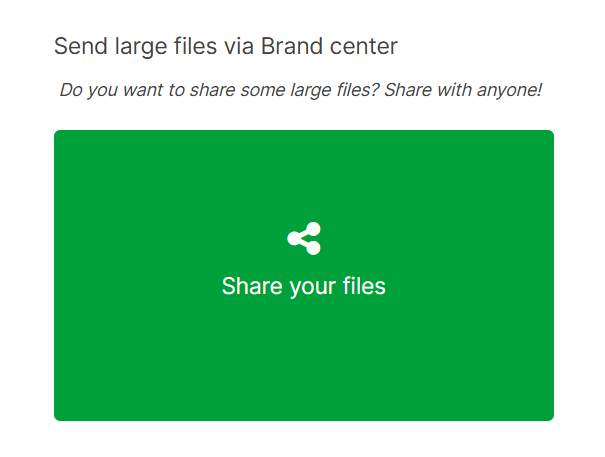
Go to Teva Brand Center and scroll down the page until you see this "Share your files" green box |
 |
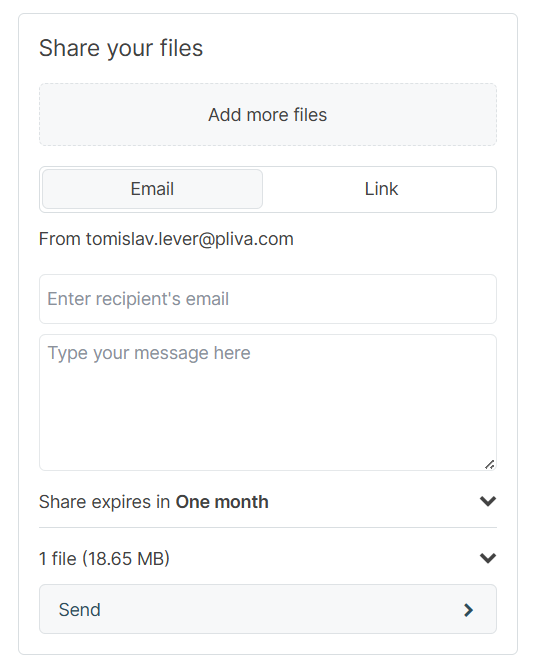
Click on "Share your files" and select the file you want to send |
 |
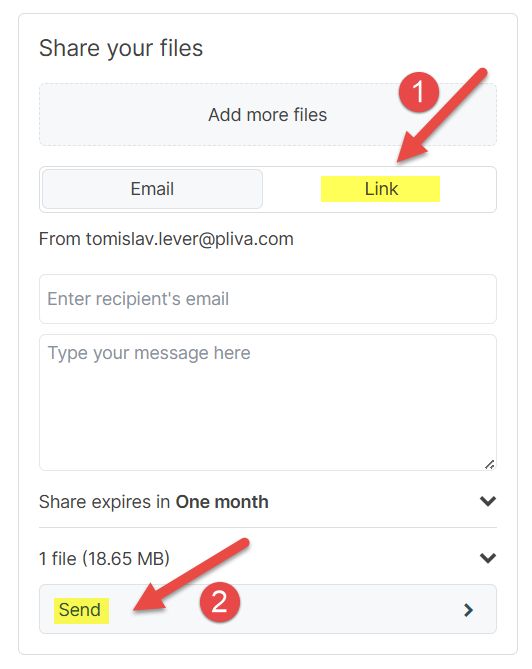
Click on "Link"(1) and "Send"(2) |
 |
Wait for your file to upload and when it's done, you can copy the link of the file using the copy button |
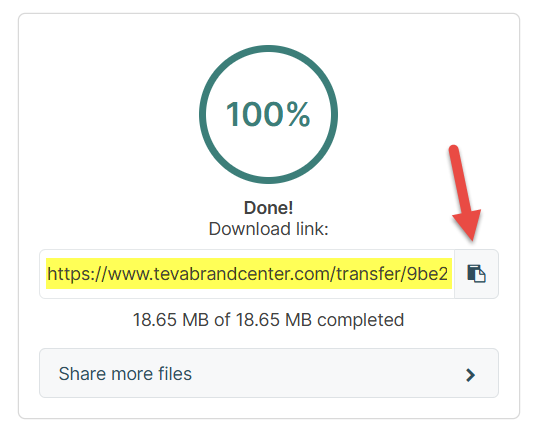
You can now paste the link of the file in the description of your request.
How to open a request in the new DigiOps ticket center
Acess
I cant access the form
Solution: open a SNOW ticket to IT support to add mailbox XY l to license group O365_ExchangeOnline_Licensing_E3. It should be done rather quickly and it solves the problem.
FAQ
All of the future requests are handled through new Customer Request Form and separate email thread will be sent for each request with the ID in the email subject so the email thread remains the only way to follow the progress of your request. You’ll receive all updates: assignment, clarifications, and resolution - directly via email.
You can check the list of your opened request here
You can use the form for all standard requests, including platform build issues, service inquiries, and general support needs.
No. The form is available to all employees. Simply log in with your company credentials.
Solution: open a SNOW ticket to IT support to add mailbox XY l to license group O365_ExchangeOnline_Licensing_E3.
It should be done rather quickly and it solves the problem.
You’ll receive a confirmation email immediately. Our team will review your request and provide updates as it progresses.
Reach out to gca.digiops@tevapharm.com for assistance.